Setting Up an Adult AI Chat Account: Privacy Basics
Account hygiene on an adult chat platform comes down to four decisions made once: which email address you register with, what kind of password you set, which device you use, and whether you sign out. None of them is complicated, and all of them are easier to get right before the first conversation than after. A reader who sends 50 messages a day is generating 1,500 messages in a 30-day month, so the account handling matters more than the individual greetings.

Key takeaways
- Register with an address you already treat as a login rather than a personal inbox, and keep that choice consistent if you ever need to recover access.
- Set a password you do not reuse anywhere else; a chat account is a login like any other, and credential reuse links accounts together.
- Use one device for the platform so sign-in state and history stay in one place instead of spreading across a phone, a laptop and a work machine.
- Sign out on shared hardware every time, and re-read the privacy wording by what it actually says: a private and secure environment with state-of-the-art encryption.
Choose the email address first
The registration address does three jobs. It identifies the account, it is the recovery channel if you lose access, and it becomes the place any platform notice arrives. That means the right choice is an address you already control and check, not a throwaway you will forget the password to within a month.
There is a trade-off either way. A dedicated login address keeps chat mail out of your main inbox but adds one more set of credentials to remember; your everyday address is simpler to recover but mixes notices into ordinary mail. Pick one intentionally and write down which you used, because account recovery is the moment this decision gets tested.
Notifications deserve a moment as well. If the service sends security or activity notices, decide where they should land before the first one arrives, and check that the folder rules on that address do not bury them. A missed security notice is the quiet cost of a login address you never open.
Passwords and re-use
The important property of a password is not length or symbol count alone, it is uniqueness. Re-using a password across two services means a problem at one becomes a problem at both, since credential lists are routinely tried against multiple sites. A passphrase of a few unrelated words is easier to remember than a random string and just as hard to guess.
If you use a password manager, store the entry under the same label as the email address you chose, and turn on any second step the service offers. Nothing here is specific to adult platforms: the account is a login, and treating it like one removes the guesswork.
One more habit belongs with these four decisions, and it lives in the browser rather than the site. A shared laptop that remembers a login is an unsigned session in practice, whatever the tab says. Keep the chat login inside a personal browser profile and use a separate profile for work accounts. Profile separation is a browser feature, not a platform one, but it does the same job as signing out in half the clicks.
The same logic applies to clearing data. Deciding in advance which device holds the account means a decision about clearing browser data has one target instead of three, and you will know before you click whether you are about to sign yourself out.
| Decision | Default drift | Better version | Why it matters later |
|---|---|---|---|
| Registration address | Whichever inbox is open | A login address you control and check | Recovery mail reaches you |
| Password | Re-used from another site | Unique passphrase stored in a manager | One leak does not spread |
| Device | Every device in reach | One device, signed in deliberately | Sign-in state stays predictable |
| Session end | Close the tab | Sign out, especially on shared hardware | An open tab is not a locked door |
Worked example: what a habit actually produces
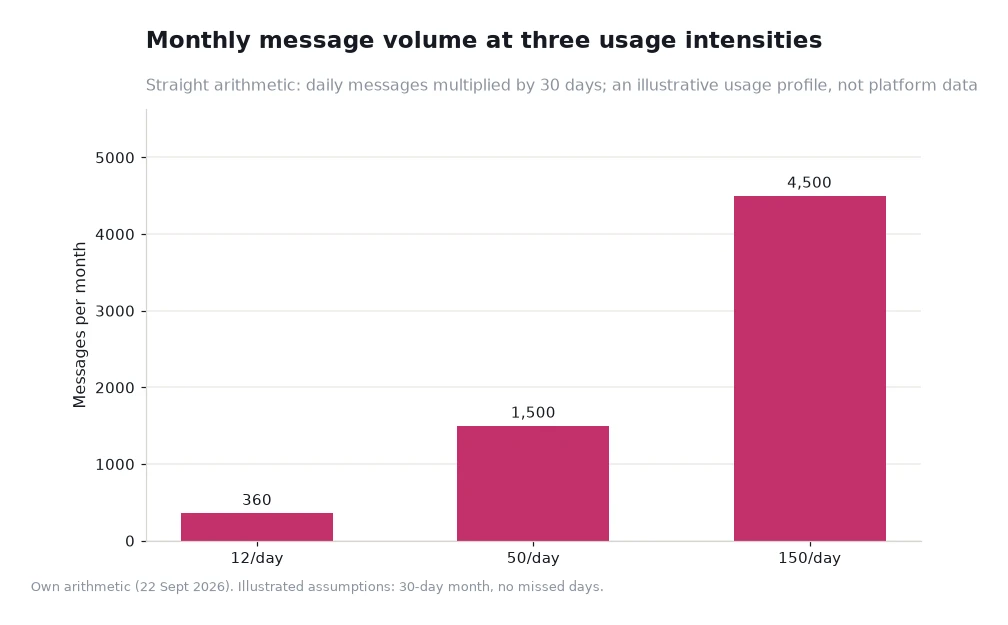
Turn a daily habit into a monthly number, then into a time budget. At 12 messages a day, 12 × 30 = 360 messages a month. At 50 a day, 50 × 30 = 1,500. At 150 a day, 150 × 30 = 4,500. The three readings are 360, 1,500 and 4,500, and the gap between the first and the third is a factor of 12.5.
The useful inference is not about volume, it is about exposure. Three hundred and sixty messages is a small enough footprint to keep tidy in one place; 4,500 is not, which is why the device and sign-out choices matter more at the upper end of that range than at the lower one.
Both figures rest on a stated assumption — a 30-day month with no missed days — rather than on platform data, so treat them as arithmetic on a habit rather than a forecast. What the arithmetic does show is that a decision made once at setup applies to every one of those messages afterwards.
What the platform says about privacy
Read the wording on its own terms. Crushon describes a private and secure environment and refers to state-of-the-art encryption, and that is the whole claim: strong handling, described specifically, inside a service that also publishes a 2257 compliance statement explaining that its content is AI-generated text and depicts no real person. Anything beyond that wording would be your addition, not theirs.
Check the links you can actually verify. At https://crushon.ai/ the navigation separates Characters, Memories and Creators, so you can see what the service stores before you rely on it. If a card or a conversation is reported, the content removal policy explains the route, and the complaints policy covers process questions.
Frequently asked questions
Should I use a separate email address for this?
A separate login address keeps notices out of your everyday inbox, and it works well as long as you can still recover it. The only bad choice is an address you cannot get back into.
Is signing out on my own phone necessary?
Not usually. Signing out matters on shared or work hardware, where an open session is visible to anyone who opens the browser.
Does the platform promise that nothing is ever retained?
No, and no responsible reading of its pages suggests that. The published wording is a private and secure environment with state-of-the-art encryption, which describes how data is handled rather than promising that nothing exists.
What is the 2257 page for?
It is the compliance statement confirming that the platform's content is AI-generated text and does not depict real people.
Set it up once, then stop thinking about it
Four decisions, one sitting, and the account is configured in a way that will still make sense in a year. Choose the login address deliberately, keep the password unique, keep the sessions in one place, and read the privacy pages rather than an older summary of them. If you are new to the catalogue, start from a small, well-chosen shortlist rather than an open grid, and let the setup work stay in the background where it belongs.
Data and sources: platform navigation, the 2257 compliance statement and the privacy wording on the Crushon site[1], read 22 Sept 2026. Message volumes are own arithmetic on an illustrated usage profile and are not platform data. This guide is for adults 18 and over.